'%3e%3cpath%20d='M102.672%20-9.9116H13.1625V97.913H102.672V-9.9116Z'%20fill='%23FFC233'/%3e%3cpath%20d='M99.319%2053.8029L70.1702%2036.3266L70.1057%20-9.84711H99.319V53.8029Z'%20fill='%23231F20'/%3e%3cpath%20d='M70.2348%20101.782L41.4084%2084.1125V18.9792L70.2348%2036.3266V101.782Z'%20fill='%23231F20'/%3e%3cpath%20d='M41.344%2018.9792V1.1804H12.2597L41.344%2018.9792Z'%20fill='%23231F20'/%3e%3cpath%20d='M144.783%2052.7711H5.35944V76.8898H144.783V52.7711Z'%20fill='%23C40E3E'/%3e%3cpath%20d='M140.721%20-0.109366H99.1255V49.5467H140.721V-0.109366Z'%20fill='%23C40E3E'/%3e%3cpath%20d='M67.0748%2062.5089C67.0748%2065.4108%2064.6887%2067.7969%2061.7868%2067.7969C58.8848%2067.7969%2056.4987%2065.4108%2056.4987%2062.5089V43.0334C56.4987%2040.1314%2058.8848%2037.7453%2061.7868%2037.7453C64.6887%2037.7453%2067.0748%2040.1314%2067.0748%2043.0334V62.5089Z'%20fill='white'/%3e%3cpath%20d='M145.622%2047.5476C148.524%2047.5476%20150.91%2049.9336%20150.91%2052.8356C150.91%2055.7376%20148.524%2058.1237%20145.622%2058.1237H52.6939C49.7919%2058.1237%2047.4058%2055.7376%2047.4058%2052.8356C47.4058%2049.9336%2049.7919%2047.5476%2052.6939%2047.5476H145.622Z'%20fill='white'/%3e%3cpath%20d='M104.607%2082.1778C104.607%2085.0798%20102.221%2087.4659%2099.319%2087.4659C96.417%2087.4659%2094.031%2085.0798%2094.031%2082.1778V23.5579C94.031%2020.6559%2096.417%2018.2698%2099.319%2018.2698C102.221%2018.2698%20104.607%2020.6559%20104.607%2023.5579V82.1778Z'%20fill='white'/%3e%3cpath%20d='M109.057%2027.2337C111.959%2027.2337%20114.345%2029.6198%20114.345%2032.5218C114.345%2035.4237%20111.959%2037.8098%20109.057%2037.8098H89.5813C86.6793%2037.8098%2084.2932%2035.4237%2084.2932%2032.5218C84.2932%2029.6198%2086.6793%2027.2337%2089.5813%2027.2337H109.057Z'%20fill='white'/%3e%3cpath%20d='M109.057%2067.7969C111.959%2067.7969%20114.345%2070.183%20114.345%2073.085C114.345%2075.9869%20111.959%2078.373%20109.057%2078.373H89.5813C86.6793%2078.373%2084.2932%2075.9869%2084.2932%2073.085C84.2932%2070.183%2086.6793%2067.7969%2089.5813%2067.7969H109.057Z'%20fill='white'/%3e%3c/g%3e%3c/svg%3e)
Third-Party Agents: Instructions for Using the Maryland Unemployment Insurance Portal (BEACON)
Third-party agents can use the Maryland Unemployment Insurance Portal (BEACON) for Agents to complete several unemployment insurance tasks on behalf of a business. This page provides instructions to complete common tasks.
Learn more about unemployment insurance reporting systems.
A third-party agent is an individual authorized by an employer to act on its behalf. A third-party agent is required to have an active Power of Attorney approved by the Maryland Division of Unemployment Insurance to perform tasks on behalf of an employer.
Note: A third-party agent account can have:
- One individual user
OR - Multiple users who access the same account using individual login credentials
A third-party agent can register or activate an account on the Maryland Unemployment Insurance Portal (BEACON) for Agents.
Activate my account
If you have a Maryland unemployment insurance agent account number:
- Go to the Maryland Unemployment Insurance Portal (BEACON)
- Select “I need to activate my account" and follow the prompts

To activate your agent account, you will need to enter your Maryland unemployment insurance agent account number and an unemployment insurance employer account number for one of your clients. You will also need to enter either the:
- Amount of the last payment you made for this client (whose unemployment insurance employer account number you entered); or
- The total gross wages reported for this client.
Register my account
If you do not have a Maryland unemployment insurance agent account number:
- Select “Register for an Account" and follow the prompts

To register your agent account, you will need to provide your contact information (name, email address, and phone number), as well as information about your client, including the business’s legal name, FEIN, email address, and address.
A third-party agent will receive a Maryland third-party agent unemployment insurance account number (also referred to as an ID number) immediately after completing the registration process in the Maryland Unemployment Insurance Portal (BEACON) for Agents.
To access the account number, log in to the Maryland Unemployment Insurance Portal (BEACON). The agent’s account number (also called an ID number) will be in the upper left corner of the screen.

When a third-party agent logs in to the Maryland Unemployment Insurance Portal (BEACON) for Agents, the homepage will display the total unpaid taxes and penalty charges, as well as recent quarterly wage reports (also called quarterly contribution and employment reports) that were filed or are due.

A third-party agent can also access payment confirmations, payment history information, and make payments in the Maryland Unemployment Insurance Portal (BEACON). To access these options, navigate to the left menu and select “Payments.” Select the relevant option to proceed.

Third party agents making a payment on behalf of an employer may pay by ACH debit or ACH credit in the Maryland Unemployment Insurance Portal (BEACON) for Agents or by paper check.
Payment instructions are available in the Maryland Unemployment Insurance Portal (BEACON) Agent Payment Allocation Files Instructions and in this Third-Party Agent Payment Submission tutorial video.
Pay inMaryland Unemployment Insurance Portal (BEACON)
- Log in to the Maryland Unemployment Insurance Portal (BEACON).
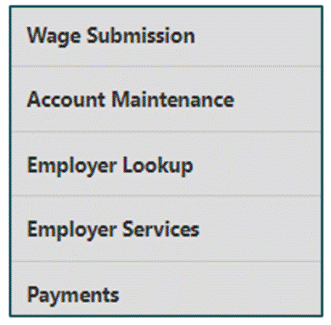
- Navigate to the left menu and select “Payments”.
- Select “Make Payments”.
- The employer name and the amount owed will be displayed.
- Choose whether you will manually allocate payments or submit a payment allocation file and follow the prompts.
Pay with ACH credit or ACH debit
- The third-party agent must generate the allocation file in the Maryland Unemployment Insurance Portal (BEACON) and then proceed to make payments.
- A third-party agent who chooses to make payments by ACH debit will need to enter their bank account number and routing number.
- If a third-party agent chooses to make payments by ACH credit, the agent must download the ACH credit file from Maryland Unemployment Insurance Portal (BEACON) and send the file to their bank.
Pay by check
Send the check by mail to: P.O. Box 17291 Baltimore, MD 21297-0365.
Note: If a third-party agent submits a payment by check, posting a check payment to the proper employer’s account requires manual intervention, which will cause a delay in processing the payment.
To file a report in the Maryland Unemployment Insurance Portal (BEACON):
- Select “Wage Submission” from the left menu
- Review the clients who have not submitted wage reports and select “Next”
- Enter an email address and select the file type from the dropdown menu