'%3e%3cpath%20d='M102.672%20-9.9116H13.1625V97.913H102.672V-9.9116Z'%20fill='%23FFC233'/%3e%3cpath%20d='M99.319%2053.8029L70.1702%2036.3266L70.1057%20-9.84711H99.319V53.8029Z'%20fill='%23231F20'/%3e%3cpath%20d='M70.2348%20101.782L41.4084%2084.1125V18.9792L70.2348%2036.3266V101.782Z'%20fill='%23231F20'/%3e%3cpath%20d='M41.344%2018.9792V1.1804H12.2597L41.344%2018.9792Z'%20fill='%23231F20'/%3e%3cpath%20d='M144.783%2052.7711H5.35944V76.8898H144.783V52.7711Z'%20fill='%23C40E3E'/%3e%3cpath%20d='M140.721%20-0.109366H99.1255V49.5467H140.721V-0.109366Z'%20fill='%23C40E3E'/%3e%3cpath%20d='M67.0748%2062.5089C67.0748%2065.4108%2064.6887%2067.7969%2061.7868%2067.7969C58.8848%2067.7969%2056.4987%2065.4108%2056.4987%2062.5089V43.0334C56.4987%2040.1314%2058.8848%2037.7453%2061.7868%2037.7453C64.6887%2037.7453%2067.0748%2040.1314%2067.0748%2043.0334V62.5089Z'%20fill='white'/%3e%3cpath%20d='M145.622%2047.5476C148.524%2047.5476%20150.91%2049.9336%20150.91%2052.8356C150.91%2055.7376%20148.524%2058.1237%20145.622%2058.1237H52.6939C49.7919%2058.1237%2047.4058%2055.7376%2047.4058%2052.8356C47.4058%2049.9336%2049.7919%2047.5476%2052.6939%2047.5476H145.622Z'%20fill='white'/%3e%3cpath%20d='M104.607%2082.1778C104.607%2085.0798%20102.221%2087.4659%2099.319%2087.4659C96.417%2087.4659%2094.031%2085.0798%2094.031%2082.1778V23.5579C94.031%2020.6559%2096.417%2018.2698%2099.319%2018.2698C102.221%2018.2698%20104.607%2020.6559%20104.607%2023.5579V82.1778Z'%20fill='white'/%3e%3cpath%20d='M109.057%2027.2337C111.959%2027.2337%20114.345%2029.6198%20114.345%2032.5218C114.345%2035.4237%20111.959%2037.8098%20109.057%2037.8098H89.5813C86.6793%2037.8098%2084.2932%2035.4237%2084.2932%2032.5218C84.2932%2029.6198%2086.6793%2027.2337%2089.5813%2027.2337H109.057Z'%20fill='white'/%3e%3cpath%20d='M109.057%2067.7969C111.959%2067.7969%20114.345%2070.183%20114.345%2073.085C114.345%2075.9869%20111.959%2078.373%20109.057%2078.373H89.5813C86.6793%2078.373%2084.2932%2075.9869%2084.2932%2073.085C84.2932%2070.183%2086.6793%2067.7969%2089.5813%2067.7969H109.057Z'%20fill='white'/%3e%3c/g%3e%3c/svg%3e)
Claimants: Instructions for Using the Maryland Unemployment Insurance Portal (BEACON)
The Maryland Unemployment Insurance Portal (BEACON) is the Maryland Division of Unemployment Insurance’s 24/7 online system, which you can use to apply for benefits and complete additional unemployment insurance tasks.
The landing page for the Maryland Unemployment Insurance Portal (BEACON) was recently updated to create a simpler, more streamlined user experience. Explore the Maryland Unemployment Insurance Portal (BEACON) page
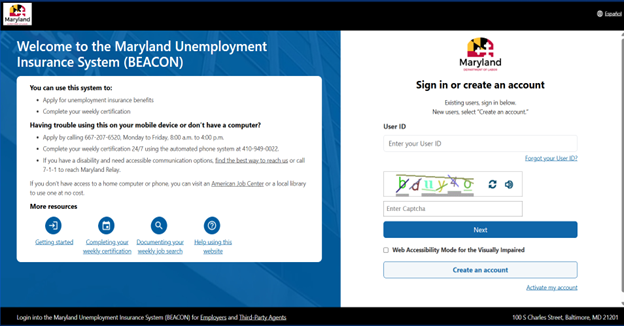
This page provides instructions to complete common tasks in the Maryland Unemployment Insurance system.
The Maryland Unemployment Insurance Portal (BEACON) is available 24/7 and allows you to:
- Apply for unemployment benefits
- Complete your weekly certifications to continue collecting unemployment benefits
- Update tax withholding requests
- Receive immediate updates about your claim status, including information about your eligibility for unemployment insurance benefits
- Review benefit payment history
- Update your account details like name, address, and email
There is also a mobile app, MD Unemployment for Claimants, which allows claimants to complete several unemployment insurance tasks from a mobile device, except for filing a first claim. You must create a Maryland Unemployment Insurance Portal (BEACON) account and file your initial claim before using the app. The app is free to download from the Google Play Store and iOS (Apple) App Store.
If you still have questions or need help, you can contact a claims agent.
Gather the information you need to open an account
You’ll need to provide personal information and your employment history. You may be asked to provide additional financial or employment documents.
Personal Information
- Name
- Date of Birth
- Social Security Number or Alien Registration Number (if you are not a U.S. Citizen or National)
- Residential and Mailing Address
- Telephone Number and Email Address
- If you have dependents 15 or younger, you will need to provide the name, date of birth, and Social Security Number for each. A dependent is a son, daughter, stepchild, or legally adopted child 15 or younger whom you support financially. Only one parent may claim each dependent (up to a maximum of 5 dependents) during any one-year benefit period.
Employment History for the Last 18 Months
For each employer you worked for in the last 18 months before the date on your claim, you’ll need the:
- Business, company, or organization name
- Complete mailing address from your pay stubs or other documents
- Phone number
- Employment start and end date—and, if applicable, a return-to-work date
- Reason for separation
- Federal employees: An SF-8 form or an SF-50 showing your separation. If you don’t have access to these at the time you need to file your claim, you can provide your most recent SF-50 that shows your salary or rate (Box 20 C) and your duty station (Box 39).
- Military members: Former military status and DD-214 Member 4 Document
- Non-U.S. Citizens: Alien Registration Number
- Union members: Union name and Local number
You may be asked for additional documents
- Pay stubs
- Tax forms like a W-2, 1099, Schedule K-1, or Tax Return - Schedule C
- Summary of quarterly reports
- Accounts receivable statement
- Profit and loss statement
- Documentation showing a travel restriction that prevents you going to work
- Business Formation Papers (Business Registration or Charter, EIN, etc.)
- Independent Contractor Agreement
- For a deceased veteran, an obituary or DD214
Create your account
To use the Maryland Unemployment Insurance Portal (BEACON), you must create an account with a username and password, which you will use to log in to the system.
To create a Maryland Unemployment Insurance Portal (BEACON) account:
- Go to the Maryland Unemployment Insurance Portal (BEACON) login page
- Select the Create an account button and follow the prompts.
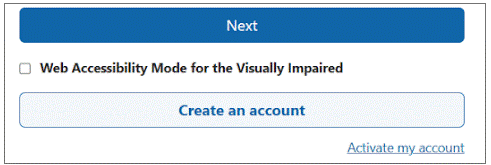
- NOTE: If you have filed for Maryland unemployment insurance benefits before, please activate an account. To do so, select the Activate my account link on the login page and follow the prompts.

Please note that when creating your account, usernames can not have any special characters, but passwords must include at least one special character (for example, @, #, !, *).
If you started an application, but did not complete it, log in to Maryland Unemployment Insurance Portal (BEACON). The system will automatically direct you to your unfinished application.
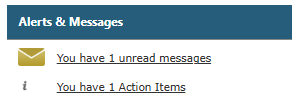
If you are eligible to reopen a claim, you will have a “Reopen Claim” action item in the Maryland Unemployment Insurance Portal (BEACON) under the Alerts & Messages section.
To log in to Maryland Unemployment Insurance Portal (BEACON):
- Go to the login page
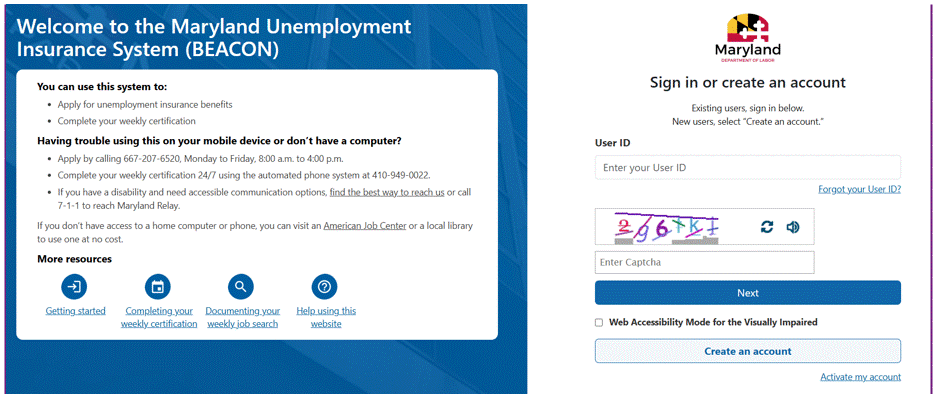
- Enter your User ID. Then, enter the Captcha code displayed and select the Next button.
- Enter your password and follow the prompts to log in.

Reset User ID
- Go to Maryland Unemployment Insurance Portal (BEACON)
- Select the Forgot User ID link.
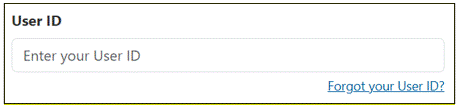
- Enter the email address associated with your account. Then, enter the Captcha code, select the Next button and follow the prompts.
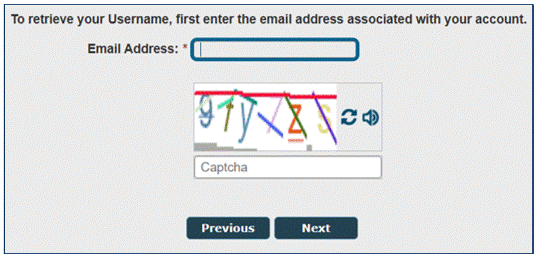
- If you are having trouble with the Captcha code, you can select the speaker icon to hear the letters and numbers that are displayed. You can also select the refresh icon to view a new Captcha code.
Reset Password
- Go to the BEACON landing page. Enter your user ID and the Captcha code and then select next.
- You can enter your password on this screen. To reset, select the forgot password link and follow the prompts.
If you could not reset your user ID or password, contact a claims agent.
When you sign up for an account in the Maryland Unemployment Insurance Portal (BEACON), you can set your communication preference to email, text message, or regular mail. You can change your communication preference at any time.
Note: When you receive messages by email, text message, or regular mail, they will inform you that you have a new notification in the Maryland Unemployment Insurance Portal (BEACON). Make sure to check your notification center regularly as there may be action items assigned to you for your claim to move forward.
- Go to the login page and log in to your account.
- Go to the “Quick Actions” section
- Select the “Change Communication Preference” link
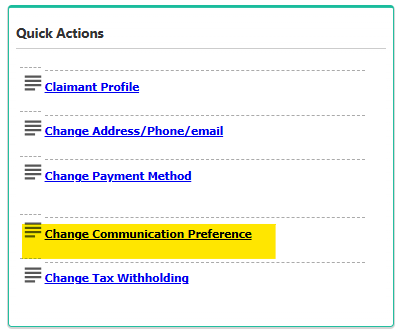
- In the “Communication Preferences” tab, go to the “Preferred Method of Communication” section
- Select your preferred method (email, text, or mail) from the dropdown menu
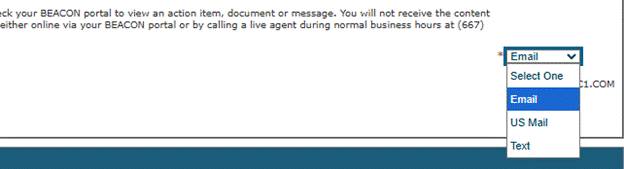
- Go to the login page and log in to your account.
- Go to the “Quick Actions” section.
- Select the “Change Address/Phone/Email” link.
- You will be taken to a screen with tabs related to your account information.
- To update an address, select the “Address Summary” tab. Select the link for the address you wish to update (residential or mailing address), enter your updated information, and select the “Save” button.
- To update an email address or phone number, select the “Contact Summary” tab. Select the link for the appropriate contact method, enter the updated information, and select the “Save” button.
If you received a notification that you have messages in the Maryland Unemployment Insurance Portal (BEACON):
- Go to the login page and log in to your account.
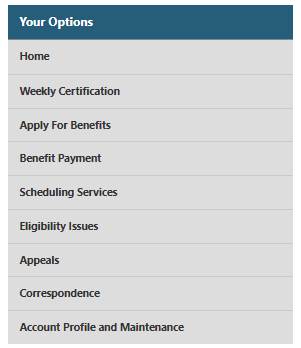
- Select “Correspondence” in the left menu.
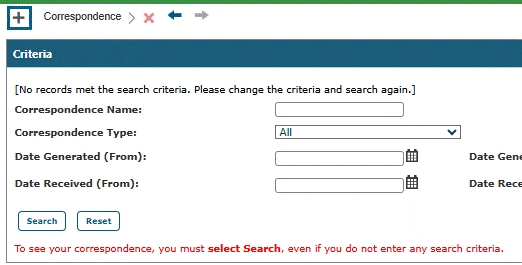
- Select the “Search” tab to display your correspondence.
- Go to the login page and log in to your account.
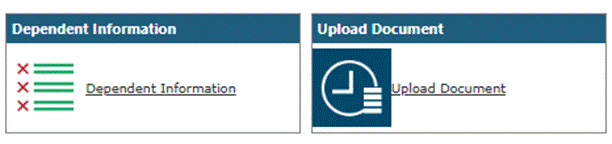
- Select “Account Profile and Maintenance” from the left menu
- Select “Upload Document”
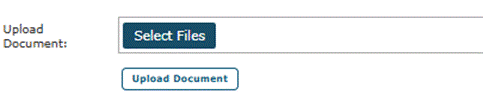
- Choose the “Select Files” button and then upload the appropriate document
- Select the Upload Document button
Note: All documents, including photos, must be legible.
If your unemployment insurance benefits claim is denied, you can file an appeal within 15 days of the denial. Learn more about appeals.
Note: You must continue to file weekly certifications during the entire appeals process if you are still unemployed.
To file an appeal or to see if you can appeal:
- Go to the login page and log in to your account.
- Select "Correspondence" from the left menu.
- Select the search button.
- If you have a determination that you may appeal, there will be a “File Appeal” link on the end of the row of that Determination. Select the File Appeal link and follow the prompts to file an appeal. At the end of that process, you will receive an appeal number.
There are 2 ways you can receive benefits payments: by direct deposit or by a check sent in the mail. When you file your initial claim, you will be asked which payment method you prefer.
If you would like to choose direct deposit but don’t have a bank account, you will have to open a bank or credit union account. To learn more about bank and credit union accounts, read the Banking Basics page from the Office of Financial Regulation. To learn about some of the many bank account options available for Marylanders, visit the CASH Campaign of Maryland’s Bank On Maryland program. Please note it is a consumer’s responsibility to thoroughly research and review any information provided by these entities before opening an account.
Changing your payment method
After the initial claim is filed, you can change your payment method by:
- Go to the login page and log in to your account.
- Under the “Quick Actions,” select “Change Payment Method”
- Follow the prompts
You can view your payment method in Maryland Unemployment Insurance Portal (BEACON) under the “Payment Information” section.
Please note: For the safety of your personal information, unemployment insurance staff (including claims agents) are unable to update or enter your bank account information.
Verifying Your Bank Account
After you have selected direct deposit as your payment method in the Maryland Unemployment Insurance Portal (BEACON), you will enter your bank account information (account type, routing number, bank name), and then select "verify."
Once your account information is verified, you will see the following message in red letters: “Bank details verification is successful. Payment method is updated.” If you do not see this message, your direct deposit enrollment is not complete.
Common fixes to failing verification
Correct mismatched information
In some cases, a bank account cannot be verified because the personal information (name or address) listed for a claimant does not match the information associated with the claimant’s bank account. These details must match and be verified to enroll in direct deposit.
To correct this, a claimant can either update their personal information in the Maryland Unemployment Insurance Portal (BEACON) or with their bank.
After you have updated your name or address (and if done so with their bank, has waited at least 3 business days), you must enter their bank account information again, and select “verify.” Once the verification process is successful, a claimant’s direct deposit enrollment is complete.
Follow the microdeposit process
If further verification of your bank account information is needed by Wells Fargo, this will happen via a microdeposit process. The purpose of this microdeposit process is to ensure that your bank account is able to receive benefit payments by direct deposit.
How it works:
- You will receive 2 deposits of less than $1.00 into your account, usually within 2 business days. You will be able to see them in your bank account’s transaction history.
- Once you have received the micro deposits in your account, you must return to the Maryland Unemployment Insurance Portal (BEACON) to confirm the amounts that were deposited. You will receive an Action Item in your portal with instructions.
- After you confirm the microdeposit amounts, a withdrawal will be made from your account to refund the amount to the Maryland Division of Unemployment Insurance.
Note: Although you can select direct deposit as your payment method in the MD Unemployment for Claimants mobile app, you cannot use the mobile app to complete the microdeposit verification process. To complete the microdeposit process, you must log in to the Maryland Unemployment Insurance Portal (BEACON).
If the microdeposit process cannot verify your bank account information, one of these may be the cause:
- You correctly entered your bank account information in the Maryland Unemployment Insurance Portal (BEACON), but you did not complete the microdeposit process by entering the amount of the two microdeposits in the Maryland Unemployment Insurance Portal (BEACON)
- You incorrectly entered your bank account information in the Maryland Unemployment Insurance Portal (BEACON), and as a result, the microdeposits were not deposited into your account.
Report lost, damaged or stolen checks
If you’ve selected to be paid by check, and you have a lost, damaged, or stolen check, report it in the Maryland Unemployment Insurance Portal (BEACON).
- Go to the login page
- Select “Benefit Payment” from the left menu
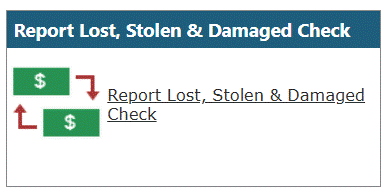
- Select “Lost, Stolen & or Damaged Check”
- Select “Search”
- Under “Payment History,” select the week ending date related to the benefit payment
- Once you have chosen the date, select “Lost, Stolen or Damaged Check(s)”
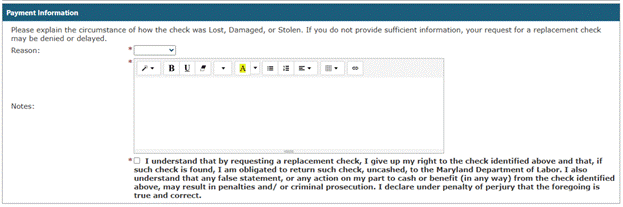
- In the “Lost, Stolen or Damaged Check Details” section, select whether your payment was lost, stolen, or damaged from the “Reason” dropdown menu then enter any additional information in the “Notes” section
- Confirm or update your address
- Submit your request to reissue your payment.